 Fahrtenbuch
A driver’s logbook for business and private trips
Fahrtenbuch is a logbook app for iPhone and Android, made for drivers in Germany. You start a trip, your phone records the route, and when you arrive you classify the trip with one tap.
App Store: review is under way. The link appears here once approved.

On a computer? Scan this with your phone.
Free · may show ads, removable once · Sign in with Apple, Google or an email code · Your logbook is stored on servers in the EU.
Who needs a logbook (Fahrtenbuch)?
In Germany, if you drive a company car privately or claim car trips as business expenses, the tax office (Finanzamt) expects you to show which kilometres were business, private or commuting. A logbook used for this has to be complete and must not be changed afterwards without it showing. A paper notebook in the glovebox soon has gaps. The Fahrtenbuch app records each trip as soon as you start it.
How does Fahrtenbuch work?
- Start the trip. Tap “Start trip” before you drive off.
- Drive. Your phone records the route by GPS, even when the app is closed or the phone is locked. No location is recorded outside of a trip.
- End and classify. When you arrive, tap “End trip” and choose Business, Private or Commute.
What does Fahrtenbuch record for each trip?
Fahrtenbuch keeps these details for each trip. The report lists them; for private trips without addresses or business details:
| Detail | Where it comes from |
|---|---|
| Date, start and end time | automatically when you start and end the trip |
| Start and destination address | automatically from the GPS position; the address comes from your phone’s address service |
| Distance driven | automatically from the recorded route |
| Category | your choice: business, private or commute (commute is suggested from your saved home and work addresses) |
| Purpose and business partner | your entry for business trips |
| Detour | an optional note, e.g. a private stop on the way |
| Fuel or electricity | an optional note in litres or kWh, your entry or read from a photo of the trip computer; on the report only in the CSV file |
| Driver | optional, your entry per vehicle or per trip |
| Odometer reading | your entry in the odometer check, e.g. at the start and end of a month; on the report, carried forward per trip from that entry and the GPS distance, empty before your first entry |
Can Fahrtenbuch also keep fuel, charging and garage receipts?
Yes. In Fahrtenbuch you enter receipts with the date, type and gross amount, and optionally the quantity in litres or kWh and a note. The types are fuel, charging, servicing, insurance, vehicle tax and other. The app shows your costs per month and per year, because the logbook method needs all costs documented.
A receipt is never deleted or changed: a wrong one is cancelled with a reason and entered again. Fahrtenbuch keeps no image of the receipt. Keep the original yourself.
What do I do about a private stop on a business trip?
You split the trip in Fahrtenbuch into two parts, each with its own category. For this you enter the time of the stop, the kilometres up to it, the place and a reason. The original trip stays visible as “Split” in the history and on the report. A split cannot be undone.
Can I record in Fahrtenbuch who was driving?
Yes, optionally. In Fahrtenbuch you can set a default driver for each vehicle; new trips get that name, and you can change it per trip. The name appears on the report. Once a trip’s deadline has passed, a change needs a reason and stays visible on the report. A driver is only a name on the report, not an account of its own; nobody else gets access to your logbook through it.
Can entries in Fahrtenbuch be changed later?
In this app you can classify and edit a trip for 7 days. After that the entry is Locked. Later changes are only possible as a correction with a reason, and the original entry stays visible in the history. Fahrtenbuch only ever appends entries and links each one to the previous ones with a checksum, so a change to a stored entry shows.
For which periods does Fahrtenbuch create reports, and how do they reach my tax advisor?
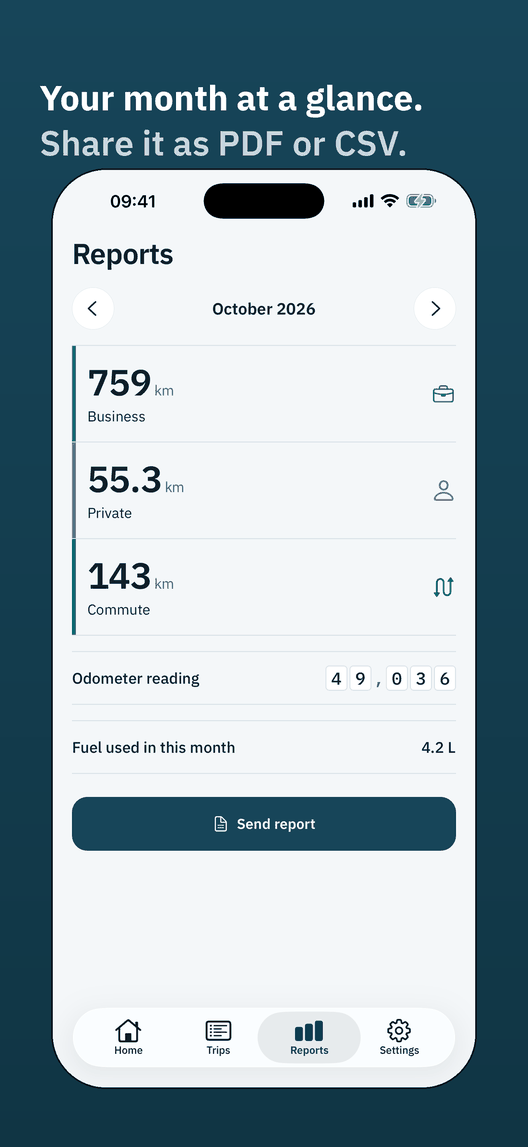
Fahrtenbuch creates reports for a month, for a whole year or for any period you choose, as a PDF or as a CSV file for Excel. The report is always in German so that the German tax office can read it. You share it through your phone’s share sheet, for example by email to your tax advisor (Steuerberater), or save it.
| Format | Contents for the chosen period |
|---|---|
| the trips and the receipts | |
| CSV, trips | the trips, one line per trip |
| CSV, receipts | the receipts, one line per receipt |
Do I need an account, and does Fahrtenbuch work offline?
Yes, you need an account: Fahrtenbuch can only be used when you are signed in. You sign in with Apple, with Google or with a code sent by email; Fahrtenbuch does not store a password. On iPhone, Apple’s own sign-in sheet opens; signing in with Google, and with Apple on Android, runs in the phone’s browser.
Fahrtenbuch records trips without internet and syncs them with your account as soon as the phone has a connection again. The street address for the start and end comes from the phone’s address service and needs a connection; offline, the app keeps the start and end as coordinates without a street address.
Can I use Fahrtenbuch on several phones and take it to a new phone?
Yes. Fahrtenbuch syncs your logbook between your phones because it is stored in your account. On a new phone you sign in to your account and get your logbook back. Entries that a phone could not sync yet are, until then, only on that phone.
Where does Fahrtenbuch store my data?
Fahrtenbuch stores your logbook in your account on Microsoft Azure servers in the EU (region North Europe, Ireland) and syncs it between your phones. For the account, Fahrtenbuch stores your email address and, when you sign in with Apple or Google, an identifier of your account there. The app can show Google ads, after your consent where required, which a one-time purchase removes. It has no third-party analytics, only anonymous counters of our own with no user id, and we do not sell data. It uses your location only while you are recording a trip; the individual GPS points stay on the phone. The street address for the start and end comes from the operating system’s address service (Apple’s on iPhone, Google’s on Android via the phone); that is a service of the platform provider, not ours.
If you delete your account in the app, Fahrtenbuch deletes your data from the server and we cannot restore it, so export your monthly reports first and keep them. Your phone’s backup (iCloud or Finder, on Android the automatic backup) may include the app data. When you open this website, our hosting provider processes ordinary web requests. The details are in the privacy policy.
Can Fahrtenbuch read the registration certificate, odometer, trip computer and receipts from a photo?
Yes, optionally. Fahrtenbuch can read a photo of the vehicle registration certificate or the car, of the odometer, of the trip computer or of a receipt and suggest values from it, for a receipt for example the date, amount and quantity; only what you check and confirm is saved. Fahrtenbuch sends the photo to Microsoft Azure OpenAI in the EU only to read it, and does not store or log it. The number of photos per account and day is limited. You can always type the values in instead.
How much does Fahrtenbuch cost?
Fahrtenbuch is free and may show ads. A one-time in-app purchase removes them.
Will the German tax office accept a logbook from this app?
The German tax office (Finanzamt) certifies no logbook app in advance and decides case by case whether a logbook is proper. Fahrtenbuch therefore has no official seal. The app is built around the known requirements: it records trips as you drive, locks entries after 7 days and shows later corrections with a reason in the report. The technical side is described in the Verfahrensdokumentation (German).
When is a logbook worth it over the 1% rule?
A logbook usually pays off when the gross list price is high and the private share is low, or when the car was bought used. The 1% rule always uses the list price as new. For electric company cars under the 0.25% rule the gain is often smaller. Fahrtenbuch does not calculate this comparison; ask your tax adviser about your case.
What Fahrtenbuch does not do
- Fahrtenbuch is a tool and does not give tax advice. Whether a logbook is accepted is for the tax office to decide. Please check with your tax advisor.
- You start and end trips yourself. Nothing records without you: the optional trip reminder (beta) only asks whether you want to start a trip.
- Fahrtenbuch does not keep your records for the tax office. Tax records have to be kept; the period is set by § 147 of the German Fiscal Code (AO) and is 6, 8 or 10 years depending on the document. Your tax advisor can tell you what applies to you. Export your reports and keep them yourself.
- If you delete your account, Fahrtenbuch deletes your logbook from the server and it cannot be restored. Play it safe with your exported reports.
Fahrtenbuch for iPhone and Android
App Store: review is under way. The link appears here once approved.
The app is available in 45 languages and supports dark mode. Questions? Write to info@codeo.com.tr.